Niles Wizard is the next best thing in creating your app!
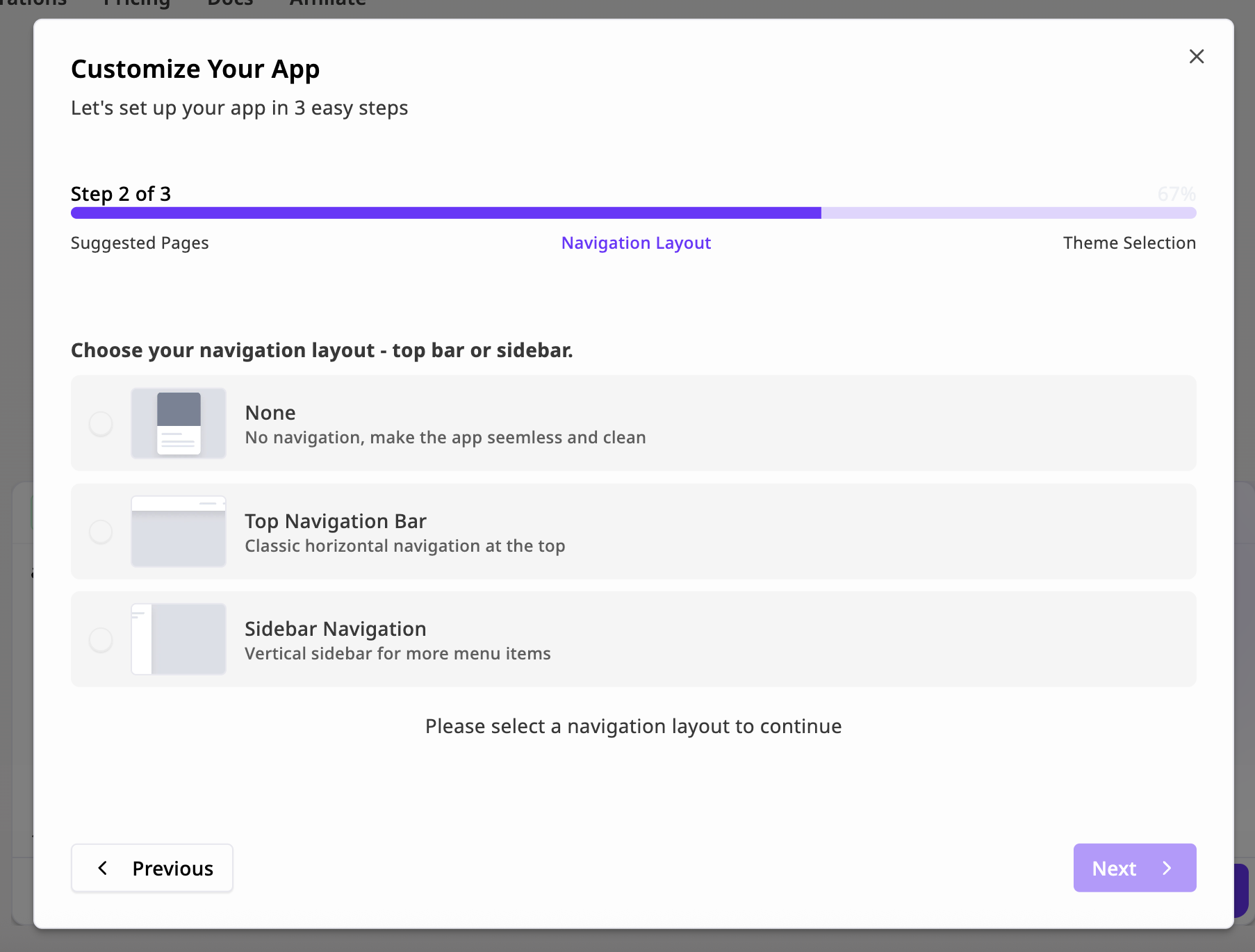
The Niles Wizard is a guided 3-step onboarding flow that helps users customize and launch their app instantly after submitting a prompt. It automatically suggests the right pages, layout, and theme based on the generated project — making it simple to go from idea to working app in under a minute. The purpose of the Wizard is to help the AI best understand the needs and requirements of the app and to get whatever is required right from the start!
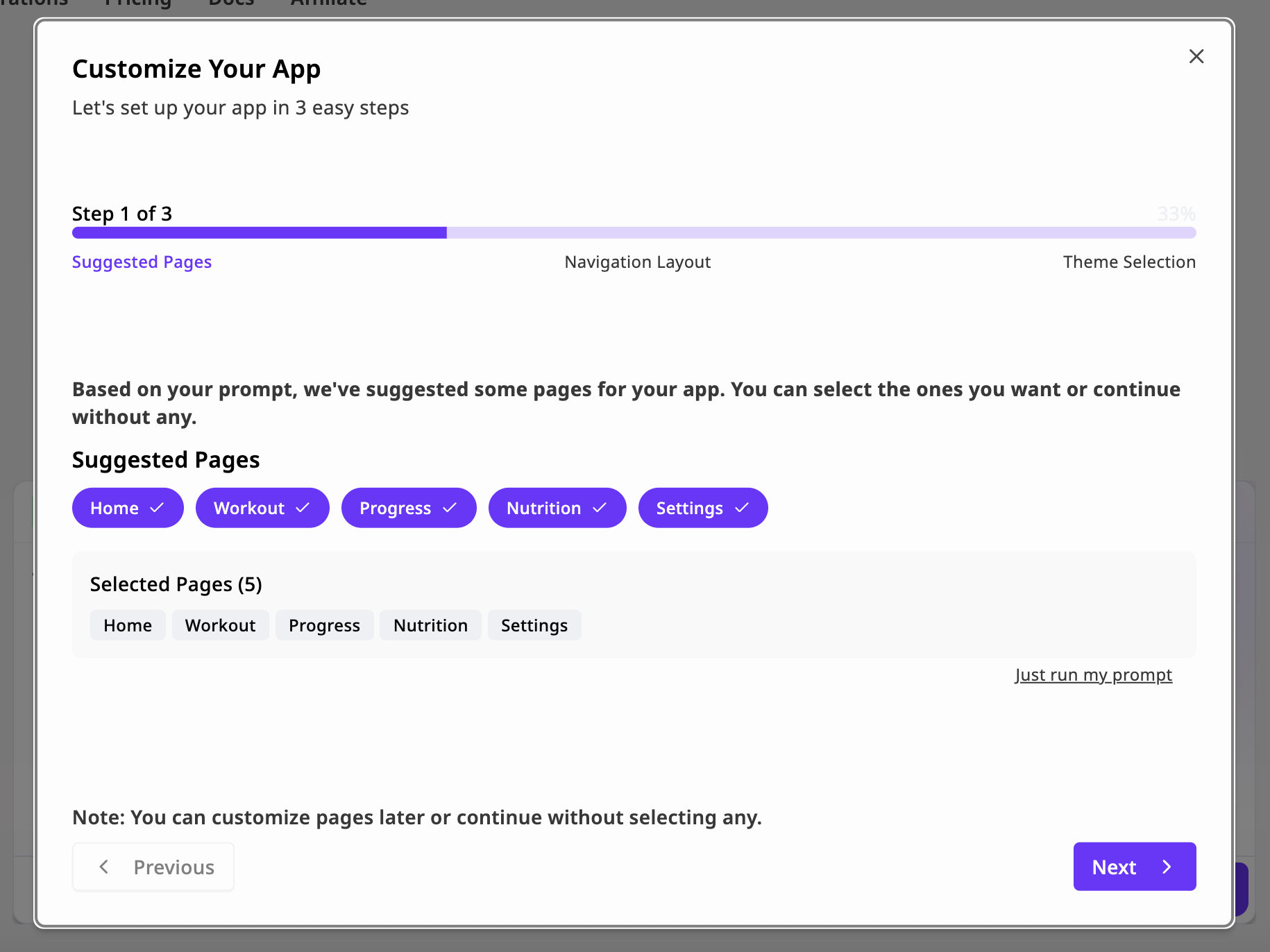
Goal: Define your app’s structure.Based on your initial prompt, Niles suggests a set of relevant pages (for example, “Home”, “Workout”, “Progress”, “Nutrition”, “Settings”). Each page is preconfigured with layout and content suited to your app type.You can select or deselect suggested pages, add custom pages later via the Editor, or remove pages that you don’t want to include in your app.
Tip: You can always edit or rename pages after generation.
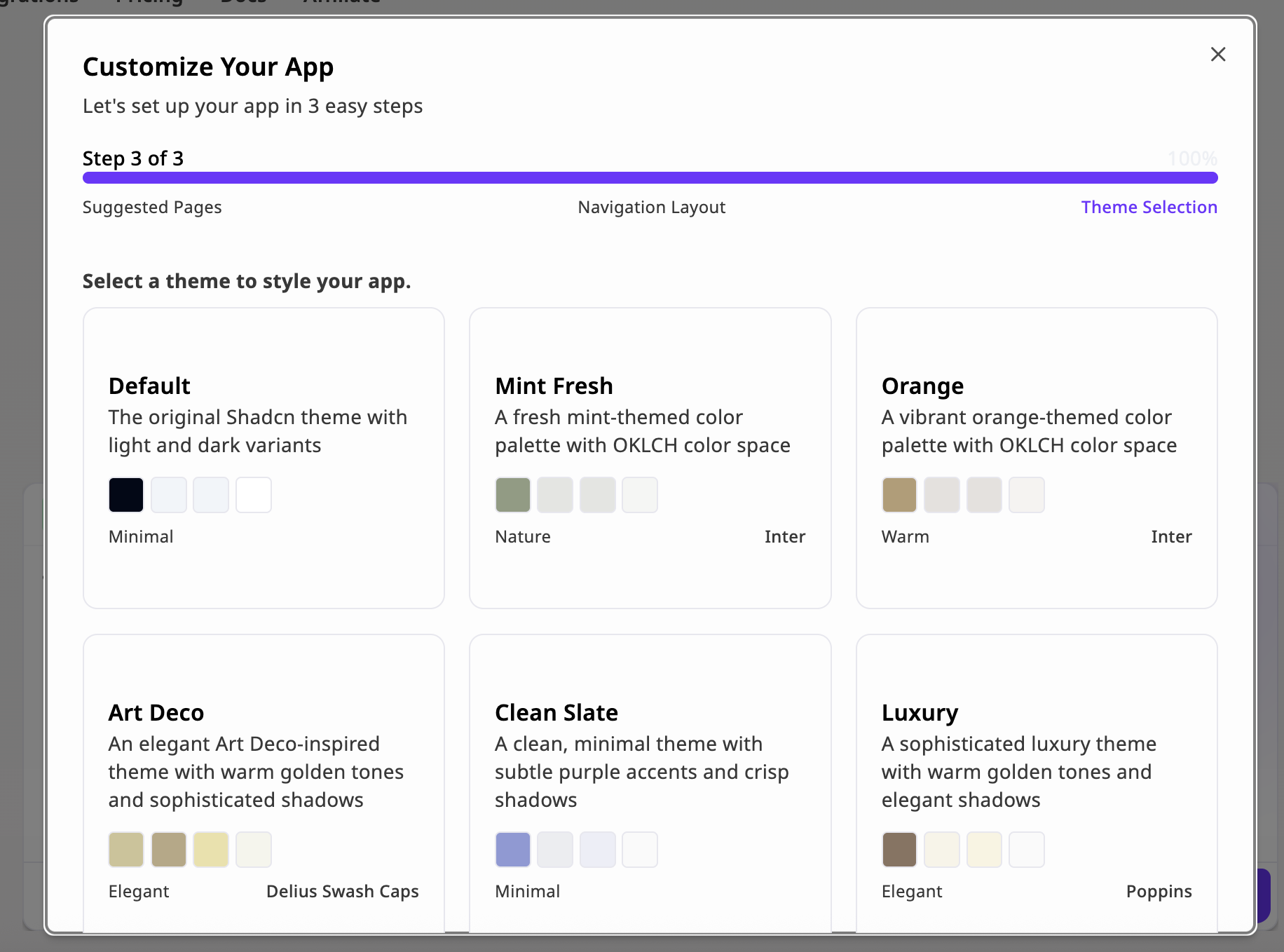
Goal: Choose the look and feel of your app.Select a predefined theme from Niles’ built-in style library. Each theme defines its own color palette, typography, and shadow system, powered by OKLCH color space for consistent brightness and contrast.
You Can always change and modify the theme and design using the design Theme tab at the top of the chat.
{"docsConfig":{"theme":"mint","$schema":"https://mintlify.com/docs.json","name":"Mint Starter Kit","colors":{"primary":"#8A00FF","light":"#8A00FF","dark":"#8A00FF"},"logo":{"light":"https://mintcdn.com/niles/SUTCqjw56Vev-iil/logo/light.svg?fit=max\u0026auto=format\u0026n=SUTCqjw56Vev-iil\u0026q=85\u0026s=e53d698c905a772cc0f80f6a7554099a","dark":"https://mintcdn.com/niles/SUTCqjw56Vev-iil/logo/dark.svg?fit=max\u0026auto=format\u0026n=SUTCqjw56Vev-iil\u0026q=85\u0026s=05e71e382963d35bb5b46adfaa0fe7c0"},"favicon":"/favicon.svg","navbar":{"links":[{"label":"Support","href":"mailto:contact@niles.dev"}],"primary":{"type":"button","label":"Niles","href":"https://app.niles.dev/"}},"footer":{"socials":{"x":"https://x.com/mintlify","github":"https://github.com/mintlify","linkedin":"https://linkedin.com/company/mintlify"}},"contextual":{"options":["copy","view","chatgpt","claude","perplexity","mcp","cursor","vscode"]},"navigation":{"global":{"anchors":[]},"pages":[]}},"deployment":{"deploymentMetadataValue":{"subdomain":"niles","hasAudioNarration":false,"actualSubdomain":"niles","customDomains":["docs.niles.dev"],"gitSource":{"type":"github","owner":"roycw","repo":"docs","deployBranch":"main","contentDirectory":"","isPrivate":false,"mountPath":"","label":""},"chroma":{"liveDeploymentHistoryId":"6a20cb342830fe13d6c49769","collectionId":"e7512949-37c5-4f77-beb4-6cdccd4acac5","schemaVersion":"v2"},"entitlements":{},"buildId":"6a20cb342830fe13d6c49769:success","clientVersion":"0.0.3966","searchFilterCounts":[{"language":"default","tag":"Documentation","count":18},{"language":"default","tag":"Getting started","count":6},{"language":"default","tag":"Guides","count":5},{"language":"default","tag":"SDK","count":4},{"language":"default","tag":"Your App","count":3}]},"assistantConfig":{},"hasChatPermissions":false,"hasWebMcpPermissions":false,"toggles":[{"name":"kill-isr","enabled":true,"variant":{"name":"disabled","enabled":false,"feature_enabled":true},"impressionData":false},{"name":"agent-mintlify-slack","enabled":true,"variant":{"name":"disabled","enabled":false,"feature_enabled":true},"impressionData":false},{"name":"editor-v7-file-tree","enabled":true,"variant":{"name":"disabled","enabled":false,"feature_enabled":true},"impressionData":false},{"name":"agent-integrations-settings","enabled":true,"variant":{"name":"disabled","enabled":false,"feature_enabled":true},"impressionData":false},{"name":"automations-pr-grouping","enabled":true,"variant":{"name":"disabled","enabled":false,"feature_enabled":true},"impressionData":false},{"name":"custom-prefix","enabled":true,"variant":{"name":"disabled","enabled":false,"feature_enabled":true},"impressionData":false},{"name":"analytics-v7","enabled":true,"variant":{"name":"disabled","enabled":false,"feature_enabled":true},"impressionData":false},{"name":"user-flows-analytics","enabled":true,"variant":{"name":"disabled","enabled":false,"feature_enabled":true},"impressionData":false},{"name":"no-publish-flow","enabled":true,"variant":{"name":"disabled","enabled":false,"feature_enabled":true},"impressionData":false},{"name":"workos-onboarding","enabled":true,"variant":{"name":"disabled","enabled":false,"feature_enabled":true},"impressionData":false},{"name":"llms-txt-v2","enabled":true,"variant":{"name":"disabled","enabled":false,"feature_enabled":true},"impressionData":false},{"name":"pause-universal-search-reconcile","enabled":true,"variant":{"name":"disabled","enabled":false,"feature_enabled":true},"impressionData":false},{"name":"snapshot-serving-live","enabled":true,"variant":{"name":"disabled","enabled":false,"feature_enabled":true},"impressionData":false},{"name":"stripTemperatureMiddleware","enabled":true,"variant":{"name":"disabled","enabled":false,"feature_enabled":true},"impressionData":false},{"name":"per-site-search-delta","enabled":true,"variant":{"name":"disabled","enabled":false,"feature_enabled":true},"impressionData":false},{"name":"support-platform-pylon-zendesk","enabled":true,"variant":{"name":"disabled","enabled":false,"feature_enabled":true},"impressionData":false},{"name":"snapshot-serving","enabled":true,"variant":{"name":"disabled","enabled":false,"feature_enabled":true},"impressionData":false},{"name":"instant-rollback","enabled":true,"variant":{"name":"disabled","enabled":false,"feature_enabled":true},"impressionData":false},{"name":"granular-notifications-server","enabled":true,"variant":{"name":"disabled","enabled":false,"feature_enabled":true},"impressionData":false},{"name":"granular-notifications","enabled":true,"variant":{"name":"disabled","enabled":false,"feature_enabled":true},"impressionData":false},{"name":"editor-private-page-search","enabled":true,"variant":{"name":"disabled","enabled":false,"feature_enabled":true},"impressionData":false},{"name":"automations-fable","enabled":true,"variant":{"name":"disabled","enabled":false,"feature_enabled":true},"impressionData":false},{"name":"fixed-ai-action-pricing","enabled":true,"variant":{"name":"disabled","enabled":false,"feature_enabled":true},"impressionData":false},{"name":"automation-resolve-merge-conflict","enabled":true,"variant":{"name":"disabled","enabled":false,"feature_enabled":true},"impressionData":false},{"name":"scoped-publishing","enabled":true,"variant":{"name":"disabled","enabled":false,"feature_enabled":true},"impressionData":false},{"name":"mintql","enabled":true,"variant":{"name":"disabled","enabled":false,"feature_enabled":true},"impressionData":false},{"name":"page-level-analytics","enabled":true,"variant":{"name":"disabled","enabled":false,"feature_enabled":true},"impressionData":false},{"name":"editor-version-history-v2","enabled":true,"variant":{"name":"disabled","enabled":false,"feature_enabled":true},"impressionData":false},{"name":"editor-nav-generations","enabled":true,"variant":{"name":"disabled","enabled":false,"feature_enabled":true},"impressionData":false},{"name":"billing-page-v2","enabled":true,"variant":{"name":"disabled","enabled":false,"feature_enabled":true},"impressionData":false},{"name":"workspace-projects","enabled":true,"variant":{"name":"disabled","enabled":false,"feature_enabled":true},"impressionData":false},{"name":"assistant-v5","enabled":true,"variant":{"name":"disabled","enabled":false,"feature_enabled":true},"impressionData":false},{"name":"byok-sep-25","enabled":true,"variant":{"name":"disabled","enabled":false,"feature_enabled":true},"impressionData":false},{"name":"fork-pr-previews","enabled":true,"variant":{"name":"disabled","enabled":false,"feature_enabled":true},"impressionData":false},{"name":"revalidation-jwt","enabled":true,"variant":{"name":"disabled","enabled":false,"feature_enabled":true},"impressionData":false},{"name":"vite-origin","enabled":true,"variant":{"name":"disabled","enabled":false,"feature_enabled":true},"impressionData":false},{"name":"editor-agent-model-picker","enabled":true,"variant":{"name":"disabled","enabled":false,"feature_enabled":true},"impressionData":false},{"name":"billing-updated-9-15","enabled":true,"variant":{"name":"disabled","enabled":false,"feature_enabled":true},"impressionData":false},{"name":"hobby-abuse-scan","enabled":true,"variant":{"name":"disabled","enabled":false,"feature_enabled":true},"impressionData":false},{"name":"dashboard-inbox","enabled":true,"variant":{"name":"disabled","enabled":false,"feature_enabled":true},"impressionData":false}],"isAtlas":false,"googleFontsInlined":false},"customCss":[{"filePath":"style.css","content":".nav-logo{height:30px!important;width:auto!important}@media (max-width:640px){.nav-logo{height:30px!important}}"}],"page":{"pagePath":"wizard","slug":"/wizard","pageMetadata":{"title":"Wizard","description":"Niles Wizard is the next best thing in creating your app!","href":"/wizard"},"description":{"compiledSource":"\"use strict\";\nconst {jsx: _jsx} = arguments[0];\nconst {useMDXComponents: _provideComponents} = arguments[0];\nfunction _createMdxContent(props) {\n const _components = {\n p: \"p\",\n ..._provideComponents(),\n ...props.components\n };\n return _jsx(_components.p, {\n children: \"Niles Wizard is the next best thing in creating your app!\"\n });\n}\nfunction MDXContent(props = {}) {\n const {wrapper: MDXLayout} = {\n ..._provideComponents(),\n ...props.components\n };\n return MDXLayout ? _jsx(MDXLayout, {\n ...props,\n children: _jsx(_createMdxContent, {\n ...props\n })\n }) : _createMdxContent(props);\n}\nreturn {\n default: MDXContent\n};\n","frontmatter":{},"scope":{}},"pageType":"default","mdx":{"mdxSource":{"compiledSource":"\"use strict\";const{Fragment:_Fragment,jsx:_jsx,jsxs:_jsxs}=arguments[0];const{useMDXComponents:_provideComponents}=arguments[0];function _createMdxContent(props){const _components={li:`li`,ol:`ol`,p:`p`,strong:`strong`,tbody:`tbody`,td:`td`,th:`th`,thead:`thead`,tr:`tr`,..._provideComponents(),...props.components},{Heading,Note,OptimizedFrame,OptimizedImage,Table}=_components;if(!Heading)_missingMdxReference(`Heading`,true);if(!Note)_missingMdxReference(`Note`,true);if(!OptimizedFrame)_missingMdxReference(`OptimizedFrame`,true);if(!OptimizedImage)_missingMdxReference(`OptimizedImage`,true);if(!Table)_missingMdxReference(`Table`,true);return _jsxs(_Fragment,{children:[_jsx(_components.p,{children:`The Niles Wizard is a guided 3-step onboarding flow that helps users customize and launch their app instantly after submitting a prompt. It automatically suggests the right pages, layout, and theme based on the generated project — making it simple to go from idea to working app in under a minute. The purpose of the Wizard is to help the AI best understand the needs and requirements of the app and to get whatever is required right from the start!`}),`\n`,_jsx(`div`,{style:{position:`relative`,paddingBottom:`56.25%`,height:0},children:_jsx(OptimizedFrame,{src:`https://www.youtube.com/embed/IO8zaps5uFc`,title:`Niles Edge Functions`,style:{position:`absolute`,top:0,left:0,width:`100%`,height:`100%`,border:0},allow:`accelerometer; autoplay; clipboard-write; encrypted-media; gyroscope; picture-in-picture`,allowFullScreen:true})}),`\n`,_jsx(Heading,{level:`2`,id:`overview`,children:`Overview`}),`\n`,_jsx(_components.p,{children:`When you create a new app in Niles, the Wizard launches automatically. It walks you through three easy steps:`}),`\n`,_jsxs(_components.ol,{children:[`\n`,_jsx(_components.li,{children:`Suggested Pages — choose which auto-generated pages to include`}),`\n`,_jsx(_components.li,{children:`Navigation Layout — pick how users will move between pages`}),`\n`,_jsx(_components.li,{children:`Theme Selection — apply a visual style to your app`}),`\n`]}),`\n`,_jsx(_components.p,{children:`At any stage, you can skip customization and “Just run my prompt” to immediately generate the app using the defaults.`}),`\n`,_jsx(Heading,{level:`2`,id:`step-1-—-suggested-pages`,children:`Step 1 — Suggested Pages`}),`\n`,_jsx(OptimizedImage,{src:`https://mintcdn.com/niles/pfukVsYBql212wpW/images/Screenshot2025-10-17at14.07.52.png?fit=max\u0026auto=format\u0026n=pfukVsYBql212wpW\u0026q=85\u0026s=4f5c610f447c1d1319e29ca3978a55a2`,alt:`Screenshot2025 10 17at14 07 52 Pn`,\"data-og-width\":`1830`,width:`1830`,\"data-og-height\":`1372`,height:`1372`,\"data-path\":`images/Screenshot2025-10-17at14.07.52.png`,\"data-optimize\":`true`,\"data-opv\":`3`,srcset:`https://mintcdn.com/niles/pfukVsYBql212wpW/images/Screenshot2025-10-17at14.07.52.png?w=280\u0026fit=max\u0026auto=format\u0026n=pfukVsYBql212wpW\u0026q=85\u0026s=6b5396cd82e8f9deab5b6b1cd1072836 280w, https://mintcdn.com/niles/pfukVsYBql212wpW/images/Screenshot2025-10-17at14.07.52.png?w=560\u0026fit=max\u0026auto=format\u0026n=pfukVsYBql212wpW\u0026q=85\u0026s=dec54b8ae96d088b0b8fdab4020694b4 560w, https://mintcdn.com/niles/pfukVsYBql212wpW/images/Screenshot2025-10-17at14.07.52.png?w=840\u0026fit=max\u0026auto=format\u0026n=pfukVsYBql212wpW\u0026q=85\u0026s=e4b00cd477b9dd31efc0b55a7ba47caf 840w, https://mintcdn.com/niles/pfukVsYBql212wpW/images/Screenshot2025-10-17at14.07.52.png?w=1100\u0026fit=max\u0026auto=format\u0026n=pfukVsYBql212wpW\u0026q=85\u0026s=c4d13f9d6881b3378b5ff5df138e434a 1100w, https://mintcdn.com/niles/pfukVsYBql212wpW/images/Screenshot2025-10-17at14.07.52.png?w=1650\u0026fit=max\u0026auto=format\u0026n=pfukVsYBql212wpW\u0026q=85\u0026s=b5fc539324b860114403f87fbe6730fa 1650w, https://mintcdn.com/niles/pfukVsYBql212wpW/images/Screenshot2025-10-17at14.07.52.png?w=2500\u0026fit=max\u0026auto=format\u0026n=pfukVsYBql212wpW\u0026q=85\u0026s=afd90dd58e093823a081b632a45b3b4f 2500w`}),`\n`,_jsx(_components.p,{children:`Goal: Define your app’s structure.`}),`\n`,_jsx(_components.p,{children:`Based on your initial prompt, Niles suggests a set of relevant pages (for example, “Home”, “Workout”, “Progress”, “Nutrition”, “Settings”). Each page is preconfigured with layout and content suited to your app type.`}),`\n`,_jsx(_components.p,{children:`You can select or deselect suggested pages, add custom pages later via the Editor, or remove pages that you don’t want to include in your app.`}),`\n`,_jsx(Note,{children:_jsx(_components.p,{children:`Tip: You can always edit or rename pages after generation.`})}),`\n`,_jsx(Heading,{level:`2`,id:`step-2-—-navigation-layout`,children:`Step 2 — Navigation Layout`}),`\n`,_jsx(OptimizedImage,{src:`https://mintcdn.com/niles/pfukVsYBql212wpW/images/Screenshot2025-10-17at14.10.11.png?fit=max\u0026auto=format\u0026n=pfukVsYBql212wpW\u0026q=85\u0026s=ad551c8a9dec3b09cd1dfe5b31b5f692`,alt:`Screenshot 2025-10-17 at 14.10.11.png`,\"data-og-width\":`1806`,width:`1806`,\"data-og-height\":`1370`,height:`1370`,\"data-path\":`images/Screenshot2025-10-17at14.10.11.png`,\"data-optimize\":`true`,\"data-opv\":`3`,srcset:`https://mintcdn.com/niles/pfukVsYBql212wpW/images/Screenshot2025-10-17at14.10.11.png?w=280\u0026fit=max\u0026auto=format\u0026n=pfukVsYBql212wpW\u0026q=85\u0026s=6dcc4c046e6c0f79b22ca689127ab416 280w, https://mintcdn.com/niles/pfukVsYBql212wpW/images/Screenshot2025-10-17at14.10.11.png?w=560\u0026fit=max\u0026auto=format\u0026n=pfukVsYBql212wpW\u0026q=85\u0026s=98c698efa831944e1f843721984a7b80 560w, https://mintcdn.com/niles/pfukVsYBql212wpW/images/Screenshot2025-10-17at14.10.11.png?w=840\u0026fit=max\u0026auto=format\u0026n=pfukVsYBql212wpW\u0026q=85\u0026s=9d32a7c37e94913d2239a552877c1921 840w, https://mintcdn.com/niles/pfukVsYBql212wpW/images/Screenshot2025-10-17at14.10.11.png?w=1100\u0026fit=max\u0026auto=format\u0026n=pfukVsYBql212wpW\u0026q=85\u0026s=91159e32c62032d605163eeeee2ddb2a 1100w, https://mintcdn.com/niles/pfukVsYBql212wpW/images/Screenshot2025-10-17at14.10.11.png?w=1650\u0026fit=max\u0026auto=format\u0026n=pfukVsYBql212wpW\u0026q=85\u0026s=05bce1076eff34c00a272fc04f919910 1650w, https://mintcdn.com/niles/pfukVsYBql212wpW/images/Screenshot2025-10-17at14.10.11.png?w=2500\u0026fit=max\u0026auto=format\u0026n=pfukVsYBql212wpW\u0026q=85\u0026s=2c1115c9fe97c39ca01865c575ca5ba6 2500w`}),`\n`,_jsx(_components.p,{children:`Goal: Choose how users navigate your app.`}),`\n`,_jsx(_components.p,{children:`You can select between three layout styles:`}),`\n`,_jsxs(Table,{children:[_jsx(_components.thead,{children:_jsxs(_components.tr,{children:[_jsx(_components.th,{children:_jsx(_components.strong,{children:`Layout`})}),_jsx(_components.th,{children:_jsx(_components.strong,{children:`Description`})})]})}),_jsxs(_components.tbody,{children:[_jsxs(_components.tr,{children:[_jsx(_components.td,{children:`None`}),_jsx(_components.td,{children:`No navigation. A clean, single-page flow — ideal for focused experiences or landing pages.`})]}),_jsxs(_components.tr,{children:[_jsx(_components.td,{children:`Top Navigation Bar`}),_jsx(_components.td,{children:`A horizontal bar at the top. Great for apps with 3–5 core pages.`})]}),_jsxs(_components.tr,{children:[_jsx(_components.td,{children:`Sidebar Navigation`}),_jsx(_components.td,{children:`A vertical menu on the left. Recommended for dashboard-style apps or multi-section tools.`})]})]})]}),`\n`,_jsx(_components.p,{children:`Once selected, the navigation structure is automatically integrated into your app’s generated code.`}),`\n`,_jsx(Heading,{level:`2`,id:`step-3-—-theme-selection`,children:`Step 3 — Theme Selection`}),`\n`,_jsx(OptimizedImage,{src:`https://mintcdn.com/niles/pfukVsYBql212wpW/images/Screenshot2025-10-17at14.15.50.png?fit=max\u0026auto=format\u0026n=pfukVsYBql212wpW\u0026q=85\u0026s=100df9a47cf9a2d42554802cbc58c138`,alt:`Screenshot 2025-10-17 at 14.15.50.png`,\"data-og-width\":`1832`,width:`1832`,\"data-og-height\":`1358`,height:`1358`,\"data-path\":`images/Screenshot2025-10-17at14.15.50.png`,\"data-optimize\":`true`,\"data-opv\":`3`,srcset:`https://mintcdn.com/niles/pfukVsYBql212wpW/images/Screenshot2025-10-17at14.15.50.png?w=280\u0026fit=max\u0026auto=format\u0026n=pfukVsYBql212wpW\u0026q=85\u0026s=20ce192207404c6c3f28c70c401a1d62 280w, https://mintcdn.com/niles/pfukVsYBql212wpW/images/Screenshot2025-10-17at14.15.50.png?w=560\u0026fit=max\u0026auto=format\u0026n=pfukVsYBql212wpW\u0026q=85\u0026s=bde9666618e5a7784ff56dda7cd9b22c 560w, https://mintcdn.com/niles/pfukVsYBql212wpW/images/Screenshot2025-10-17at14.15.50.png?w=840\u0026fit=max\u0026auto=format\u0026n=pfukVsYBql212wpW\u0026q=85\u0026s=20be465e05f982a76cc5f8c92a08d37e 840w, https://mintcdn.com/niles/pfukVsYBql212wpW/images/Screenshot2025-10-17at14.15.50.png?w=1100\u0026fit=max\u0026auto=format\u0026n=pfukVsYBql212wpW\u0026q=85\u0026s=293ae3c30c4f8070d1333e923c4b4146 1100w, https://mintcdn.com/niles/pfukVsYBql212wpW/images/Screenshot2025-10-17at14.15.50.png?w=1650\u0026fit=max\u0026auto=format\u0026n=pfukVsYBql212wpW\u0026q=85\u0026s=69c37809044463505b269218a831b475 1650w, https://mintcdn.com/niles/pfukVsYBql212wpW/images/Screenshot2025-10-17at14.15.50.png?w=2500\u0026fit=max\u0026auto=format\u0026n=pfukVsYBql212wpW\u0026q=85\u0026s=82280ee851405ce5d83b93ddbe6bce25 2500w`}),`\n`,_jsx(_components.p,{children:`Goal: Choose the look and feel of your app.`}),`\n`,_jsx(_components.p,{children:`Select a predefined theme from Niles’ built-in style library. Each theme defines its own color palette, typography, and shadow system, powered by OKLCH color space for consistent brightness and contrast.`}),`\n`,_jsx(Note,{children:_jsx(_components.p,{children:`You Can always change and modify the theme and design using the design Theme tab at the top of the chat.`})})]})}function MDXContent(props={}){const{wrapper:MDXLayout}={..._provideComponents(),...props.components};return MDXLayout?_jsx(MDXLayout,{...props,children:_jsx(_createMdxContent,{...props})}):_createMdxContent(props)}return{default:MDXContent};function _missingMdxReference(id,component){throw new Error(`Expected `+(component?`component`:`object`)+\" `\"+id+\"` to be defined: you likely forgot to import, pass, or provide it.\")}","frontmatter":{},"scope":{"config":{},"pageMetadata":{"title":"Wizard","description":"Niles Wizard is the next best thing in creating your app!","href":"/wizard"}}},"mdxSourceWithNoJs":null},"mdxExtracts":{"tableOfContents":[{"title":"Overview","slug":"overview","depth":2,"children":[]},{"title":"Step 1 — Suggested Pages","slug":"step-1-—-suggested-pages","depth":2,"children":[]},{"title":"Step 2 — Navigation Layout","slug":"step-2-—-navigation-layout","depth":2,"children":[]},{"title":"Step 3 — Theme Selection","slug":"step-3-—-theme-selection","depth":2,"children":[]}],"codeExamples":{}},"jsLinks":[],"subdomain":"niles","siteName":"Mint Starter Kit","title":"Wizard - Mint Starter Kit","navMaps":{"firstHrefInVersion":{},"firstHrefInLanguage":{}},"lastModified":"2025-11-12T08:05:05.407Z","originalFileLocation":"wizard.mdx"},"headHtml":"\u003cscript data-mint-head>(function(){var d=document.documentElement,p=null;if(!p){try{p=localStorage.getItem(\"isDarkMode\")}catch(e){}if(p==='true')p='dark';else if(p==='false')p='light';if(p!=='light'\u0026\u0026p!=='dark'\u0026\u0026p!=='system')p=\"system\"}var r=p==='system'?(matchMedia(\"(prefers-color-scheme: dark)\").matches?'dark':'light'):p;d.classList.remove(r==='dark'?'light':'dark');d.classList.add(r);d.setAttribute(\"data-theme-preference\",p)})();\u003c/script>\u003cmeta data-mint-head name=\"description\" content=\"Niles Wizard is the next best thing in creating your app!\">\u003cmeta data-mint-head name=\"application-name\" content=\"Mint Starter Kit\">\u003cmeta data-mint-head name=\"generator\" content=\"Mintlify\">\u003clink data-mint-head rel=\"icon\" type=\"image/png\" sizes=\"192x192\" href=\"/mintlify-assets/_mintlify/favicons/niles/45I3Y21r_ilvBrZF/_generated/favicon/android-chrome-192x192.png\" media=\"(prefers-color-scheme: light)\">\u003clink data-mint-head rel=\"apple-touch-icon\" type=\"image/png\" sizes=\"180x180\" href=\"/mintlify-assets/_mintlify/favicons/niles/45I3Y21r_ilvBrZF/_generated/favicon/apple-touch-icon.png\">\u003clink data-mint-head rel=\"icon\" type=\"image/png\" sizes=\"16x16\" href=\"/mintlify-assets/_mintlify/favicons/niles/45I3Y21r_ilvBrZF/_generated/favicon/favicon-16x16.png\" media=\"(prefers-color-scheme: light)\">\u003clink data-mint-head rel=\"icon\" type=\"image/png\" sizes=\"32x32\" href=\"/mintlify-assets/_mintlify/favicons/niles/45I3Y21r_ilvBrZF/_generated/favicon/favicon-32x32.png\" media=\"(prefers-color-scheme: light)\">\u003clink data-mint-head rel=\"shortcut icon\" type=\"image/x-icon\" href=\"/mintlify-assets/_mintlify/favicons/niles/45I3Y21r_ilvBrZF/_generated/favicon/favicon.ico\" media=\"(prefers-color-scheme: light)\">\u003clink data-mint-head rel=\"icon\" type=\"image/png\" sizes=\"192x192\" href=\"/mintlify-assets/_mintlify/favicons/niles/45I3Y21r_ilvBrZF/_generated/favicon-dark/android-chrome-192x192.png\" media=\"(prefers-color-scheme: dark)\">\u003clink data-mint-head rel=\"icon\" type=\"image/png\" sizes=\"16x16\" href=\"/mintlify-assets/_mintlify/favicons/niles/45I3Y21r_ilvBrZF/_generated/favicon-dark/favicon-16x16.png\" media=\"(prefers-color-scheme: dark)\">\u003clink data-mint-head rel=\"icon\" type=\"image/png\" sizes=\"32x32\" href=\"/mintlify-assets/_mintlify/favicons/niles/45I3Y21r_ilvBrZF/_generated/favicon-dark/favicon-32x32.png\" media=\"(prefers-color-scheme: dark)\">\u003clink data-mint-head rel=\"shortcut icon\" type=\"image/x-icon\" href=\"/mintlify-assets/_mintlify/favicons/niles/45I3Y21r_ilvBrZF/_generated/favicon-dark/favicon.ico\" media=\"(prefers-color-scheme: dark)\">\u003cmeta data-mint-head property=\"og:title\" content=\"Wizard - Mint Starter Kit\">\u003cmeta data-mint-head property=\"og:description\" content=\"Niles Wizard is the next best thing in creating your app!\">\u003cmeta data-mint-head property=\"og:site_name\" content=\"Mint Starter Kit\">\u003cmeta data-mint-head property=\"og:url\" content=\"https://docs.niles.dev/wizard\">\u003cmeta data-mint-head property=\"og:type\" content=\"website\">\u003cmeta data-mint-head property=\"og:image\" content=\"https://niles.mintlify.app/_mintlify/api/og/v2?division=Guides\u0026amp;title=Wizard\u0026amp;description=Niles+Wizard+is+the+next+best+thing+in+creating+your+app%21\u0026amp;theme=4364544b321243ac8606632f\u0026amp;signature=5930a163a27a38ae65ecb7f5f752fe13482156e6d363b5201eb5a75353ee3e7c\">\u003cmeta data-mint-head property=\"og:image:width\" content=\"1200\">\u003cmeta data-mint-head property=\"og:image:height\" content=\"630\">\u003cmeta data-mint-head name=\"twitter:card\" content=\"summary_large_image\">\u003cmeta data-mint-head name=\"twitter:title\" content=\"Wizard - Mint Starter Kit\">\u003cmeta data-mint-head name=\"twitter:description\" content=\"Niles Wizard is the next best thing in creating your app!\">\u003cmeta data-mint-head name=\"twitter:image\" content=\"https://niles.mintlify.app/_mintlify/api/og/v2?division=Guides\u0026amp;title=Wizard\u0026amp;description=Niles+Wizard+is+the+next+best+thing+in+creating+your+app%21\u0026amp;theme=4364544b321243ac8606632f\u0026amp;signature=5930a163a27a38ae65ecb7f5f752fe13482156e6d363b5201eb5a75353ee3e7c\">\u003cmeta data-mint-head name=\"twitter:image:width\" content=\"1200\">\u003cmeta data-mint-head name=\"twitter:image:height\" content=\"630\">\u003cmeta data-mint-head name=\"msapplication-config\" content=\"/mintlify-assets/_mintlify/favicons/niles/45I3Y21r_ilvBrZF/_generated/favicon/browserconfig.xml\">\u003cmeta data-mint-head name=\"apple-mobile-web-app-title\" content=\"Mint Starter Kit\">\u003cmeta data-mint-head name=\"msapplication-TileColor\" content=\"#8A00FF\">\u003clink data-mint-head rel=\"canonical\" href=\"https://docs.niles.dev/wizard\">\u003clink data-mint-head rel=\"alternate\" type=\"application/xml\" href=\"/sitemap.xml\">\u003clink data-mint-head rel=\"alternate\" type=\"text/markdown\" href=\"/wizard.md\">\u003cscript data-mint-head type=\"application/ld+json\">{\"@context\":\"https://schema.org\",\"@graph\":[{\"@type\":\"Organization\",\"@id\":\"https://docs.niles.dev/#organization\",\"name\":\"Mint Starter Kit\",\"url\":\"https://docs.niles.dev\",\"logo\":{\"@type\":\"ImageObject\",\"url\":\"https://mintcdn.com/niles/SUTCqjw56Vev-iil/logo/light.svg?fit=max\u0026auto=format\u0026n=SUTCqjw56Vev-iil\u0026q=85\u0026s=e53d698c905a772cc0f80f6a7554099a\"}},{\"@type\":\"WebSite\",\"@id\":\"https://docs.niles.dev#website\",\"name\":\"Mint Starter Kit\",\"url\":\"https://docs.niles.dev\",\"publisher\":{\"@id\":\"https://docs.niles.dev/#organization\"}},{\"@type\":\"WebPage\",\"@id\":\"https://docs.niles.dev/wizard#webpage\",\"url\":\"https://docs.niles.dev/wizard\",\"name\":\"Wizard\",\"description\":\"Niles Wizard is the next best thing in creating your app!\",\"dateModified\":\"2025-11-12T08:05:05.407Z\",\"isPartOf\":{\"@id\":\"https://docs.niles.dev#website\"},\"breadcrumb\":{\"@id\":\"https://docs.niles.dev/wizard#breadcrumb\"}},{\"@type\":\"BreadcrumbList\",\"@id\":\"https://docs.niles.dev/wizard#breadcrumb\",\"itemListElement\":[{\"@type\":\"ListItem\",\"position\":1,\"name\":\"Guides\",\"item\":\"https://docs.niles.dev/AI-chat-modes\"},{\"@type\":\"ListItem\",\"position\":2,\"name\":\"Wizard\",\"item\":\"https://docs.niles.dev/wizard\"}]},{\"@type\":[\"Article\",\"TechArticle\"],\"@id\":\"https://docs.niles.dev/wizard#article\",\"headline\":\"Wizard\",\"name\":\"Wizard\",\"description\":\"Niles Wizard is the next best thing in creating your app!\",\"url\":\"https://docs.niles.dev/wizard\",\"mainEntityOfPage\":{\"@id\":\"https://docs.niles.dev/wizard#webpage\"},\"dateModified\":\"2025-11-12T08:05:05.407Z\",\"publisher\":{\"@id\":\"https://docs.niles.dev/#organization\"},\"isPartOf\":{\"@id\":\"https://docs.niles.dev#website\"}}]}\u003c/script>\u003cscript data-mint-head type=\"application/ld+json\">{\"@context\":\"https://schema.org\",\"@type\":\"WebSite\",\"name\":\"Mint Starter Kit\",\"creator\":{\"@type\":\"Organization\",\"name\":\"Mintlify\",\"url\":\"https://mintlify.com\"}}\u003c/script>","siteName":"Mint Starter Kit","nav":{"global":{"anchors":[]},"tabs":[{"tab":"Documentation","groups":[{"group":"Getting started","pages":[{"title":"Introduction","mode":"wide","href":""},{"title":"Quick start","href":"/quickstart"},{"title":"Billing, Plans \u0026 Credits","href":"/billingPlansCredits"},{"title":"Prompting guide","href":"/prompt-guide"},{"title":"FAQs","href":"/faqs"},{"title":"Community","href":"/community"}]},{"group":"Guides","pages":[{"title":"AI Chat Modes","href":"/AI-chat-modes"},{"title":"Visual Edits","href":"/visualEdits"},{"title":"Code Mode","description":"View \u0026 Edit your project’s code directly in Niles","href":"/codeMode"},{"title":"Wizard","href":"/wizard"},{"title":"File Freezing","description":"Learn how to protect specific files from AI modification in your Niles app.","href":"/freezingFiles"}]},{"group":"SDK","pages":[{"title":"SDK Overview","href":"/overview"},{"title":"Authentication","href":"/authentication"},{"title":"Storage","href":"/storage"},{"title":"LLM (AI)","href":"/llm"}]},{"group":"Your App","pages":[{"title":"Membership Handling \u0026 Landing Pages","href":"/MembershipHandlingLandingPages"},{"title":"Integrations","href":"/integrations"},{"title":"Backend Functions","href":"/backendFunctions"}]}]}]},"title":"Wizard - Mint Starter Kit","buildId":"dpl_cadrRc5H9XQiJQbDFN5mcYRs2PAj","deploymentId":"dpl_cadrRc5H9XQiJQbDFN5mcYRs2PAj","dynamics":["a74be98ba7"],"chunks":["zoom-image-lightbox-B0E5HDf_.js","lightbox-handle-r17bVUz3.js"]}